MuleSight™
for Confluence
Bring MuleSoft Anypoint visibility directly into Confluence. Auto-convert links into live snapshot cards, compare environments, detect drift, and chat with a Rovo agent.

Snapshot Macros
Paste a link, get a live snapshot
MuleSight™ auto-converts Anypoint URLs into live data cards. Three link types, multiple display options.
Embed Exchange asset metadata - type, publish status, version, and last updated.
- Asset name
- Type
- Publish status
- Version
- Last updated
Embed deployment snapshots - application status, version, target, and public endpoint.
- Deployment name
- App status
- Artifact version
- Target name/type
- Public endpoint
Pin API instances - status, version, security summary, and Exchange mapping.
- API name
- Status
- Version
- Security summary
- API Instance ID
MuleSight Specialist Rovo Agent
Chat with an AI agent from anywhere in Confluence. Ask about app statuses, API policies, environment health, and security posture - with answers grounded in your actual MuleSoft data.
Non-hallucination guardrails
If a status is unknown, the agent says so and recommends refreshing
Cache-first, explicit freshness
Always reports snapshot timestamp so you know how current answers are
On-demand refresh
Can refresh datasets and API security data when you ask for it
Built on Atlassian Rovo
AI agent accessible from anywhere in Confluence
Features
Full MuleSoft visibility in Confluence
Link-to-Snapshot Macros
Paste Anypoint URLs and they auto-convert into live snapshot cards. Supports Exchange, Runtime Manager, and API Manager links.
Snapshot macros guideGlobal Landing Page
Centralized dashboard with environment health, recent drift events, and shortcuts to every MuleSight surface in your space.
Landing page tourEnvironment Comparison
Compare MuleSoft resources across environments with drift-focused analysis. Spot version mismatches and missing deployments instantly.
Comparison dashboardAPI Security Posture
Scan API protection posture per environment. View policies, SLA tiers, contracts, and security drift across your API landscape.
API Security Posture guideDiagnostics
Probe MuleSoft endpoints, surface 403 and timeout failures per dataset, and check OAuth scope coverage to debug snapshot failures fast.
Diagnostics referenceMuleSight Rovo Agent
Ask your Rovo AI agent about MuleSoft state directly in Confluence — drift, policies, deployments, and more, grounded in MuleSight data.
Rovo agent guideOps Dashboard
Live operational dashboard for MuleSoft platform health — runtime status, error rates, and drift incidents in a single Confluence page.
Ops Dashboard guideSecure Connected App Model
Uses MuleSoft Connected App client credentials. Secrets stored with Forge encrypted storage. Egress limited to anypoint.mulesoft.com.
Configuration guideUpcoming Modules
MuleSight roadmap — preview the next dashboards, integrations, and AI experiences arriving for MuleSoft teams in Confluence.
Roadmap previewWhat is Drift?
In MuleSight, drift means the same logical resource differs across selected environments by presence (deployed vs not deployed), version (artifact version), or status (e.g., RUNNING vs STOPPED).
Security drift is intentionally non-noisy: it compares only enabled policies by template identity, ignores disabled policies and version differences, and treats contract counts as informational only.
Presence
Deployed in one env, missing in another
Version
Different artifact versions across envs
Status
RUNNING vs STOPPED, ACTIVE vs INACTIVE
From the Blog
MuleSoft + Confluence guides

MuleSight vs DIY MuleSoft Architecture Docs
Compare manual Confluence architecture docs with live MuleSoft snapshots, drift review, and API posture context.
Read more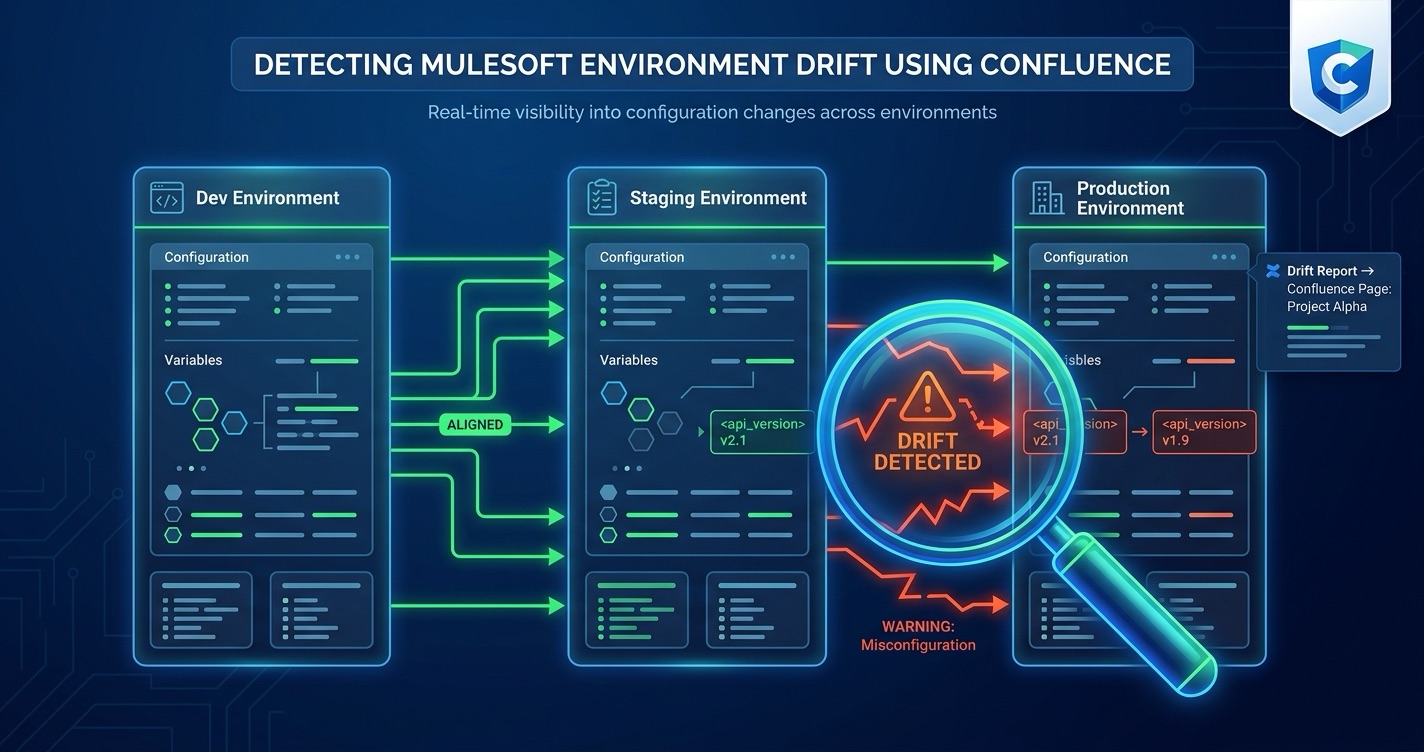
Detecting MuleSoft Environment Drift Using Confluence
How to use environment comparison to keep MuleSoft architecture docs honest across environments.
Read moreYour MuleSoft Documentation Is Already Stale
Why static screenshots decay and how live snapshot macros keep documentation current.
Read moreGet MuleSoft visibility in Confluence
Install MuleSight from the Atlassian Marketplace. Configure your Connected App credentials once and start pasting Anypoint URLs.