

ApprovalFlow vs Comala vs AppFox is a choice about how your Confluence Cloud review process should work. Shortlist ApprovalFlow for version-aware review of published pages without hard content locks, Comala for configurable document lifecycle controls, and AppFox Workflows for visual workflow design and publishing controls. Then test the behavior your policy actually requires.
We make ApprovalFlow. This comparison describes documented capabilities, not a hands-on benchmark of the competing apps. Competitor Marketplace listings and linked vendor documentation were checked on October 21, 2026. We do not use install counts, old pricing snapshots, or a vendor’s choice of terminology to claim that another app lacks a feature.
Important: AppFox Workflows for Confluence is not AppFox Approvals for Confluence. They are separate products. The AppFox column below refers to Workflows.
ApprovalFlow vs Comala vs AppFox: compare the review model
| Requirement | ApprovalFlow | Comala Document Management | AppFox Workflows |
|---|---|---|---|
| Review setup | Single-step or sequential multi-step workflows, byline submissions, and reviewer decisions. | Configurable lifecycle workflows, role-based reviews, and state-change automation. | Drag-and-drop builder, templates, custom statuses, and multi-stage approvals. |
| Version context | Per-page-version approval tracking. Change Sets compare current and approved versions and surface stale state. | The listing documents version accuracy, custom versioning, and document activity. Test the exact edit/review behavior you need. | The listing documents official major/minor versions and approval history. Test how those relate to Confluence revisions. |
| Access and publishing | Soft review of published pages. No hard content locks or publication blocking. | The listing describes access controls and configurable actions such as restrictions and page copies. Validate the chosen workflow. | Vendor documentation describes content restrictions and publishing approved content across spaces. |
| Review evidence | Approval Queue, decision comments, lifecycle comments, Workflow Analytics, and page-version context. | Document activity and reporting for workflow states, reviewers, and approval history. | Retained and exportable approval history, workflow history, review dates, and expiry controls. |
| What to pilot | Approve, edit, inspect stale version context, and submit the current version again. | Configure your lifecycle and check state changes, reviewer rules, access, and reporting. | Build your workflow and verify draft visibility, approved publishing, versioning, and expiry. |
This table summarizes the sources below. A documented feature is not proof that a particular configuration meets your policy.
Choose ApprovalFlow when the decision must identify the reviewed version
ApprovalFlow for Confluence is built on Atlassian Forge. It supports space-scoped workflows, submission from the page byline, reviewer decisions with comments, Approval Queue, and Workflow Analytics. Related page changes can be grouped into a Change Set with shared context and an optional reference link.
The practical boundary is just as important: ApprovalFlow reviews published pages and does not block publication. It does not lock content or replace Confluence permissions. Choose it when your process needs visible review decisions and version context while collaboration continues. If your requirement is that unapproved changes must be hidden from readers, you need a separate publishing or access control.
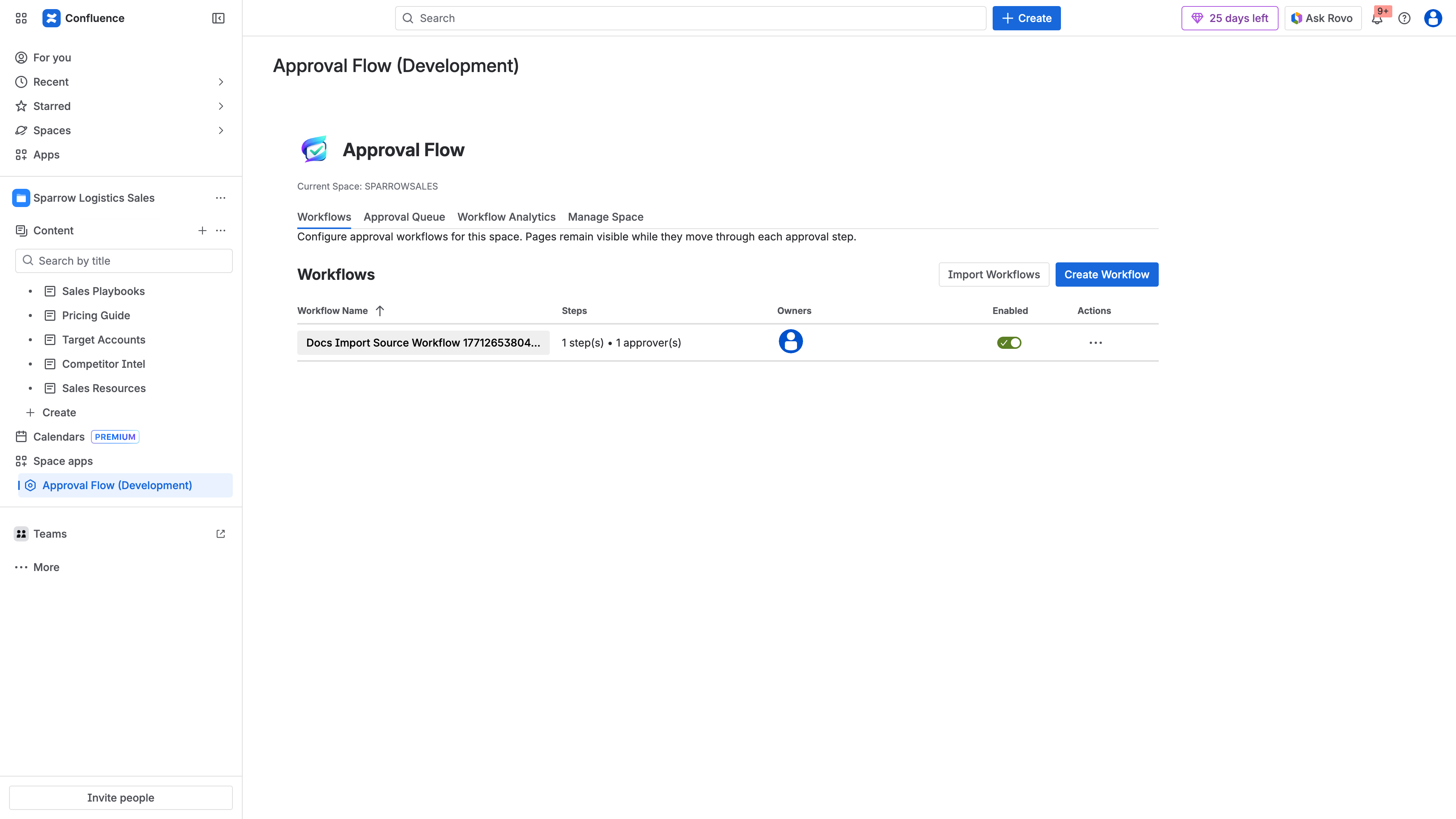
ApprovalFlow workflows are configured in the Confluence space. Start with the review stages your team needs rather than recreating an entire document lifecycle.
An edit does not automatically restart the workflow. The earlier decision retains its version context, stale detection exposes the mismatch, and the owner submits the current version when another review is required. See the version-aware review walkthrough and the Change Sets documentation for current-versus-approved version tracking.
Choose Comala when you need configurable document lifecycle controls
Comala Document Management’s Cloud listing describes lifecycle automation, role-based reviews, e-signatures, expirations, document activity, and workflow actions including restrictions and page copies. Its Cloud getting-started guide shows applying a workflow, assigning reviewers, deciding in the workflow-state dialog, and inspecting the document report.
That makes Comala worth evaluating when your requirements go beyond a review decision into managed lifecycle states and associated actions. Test the exact workflow, rather than assuming every template enforces the same controls. Cloud and Data Center documentation are separate; do not carry behavior from one edition into the other.
Choose AppFox Workflows when visual design and publishing controls matter
AppFox’s getting-started guide documents a drag-and-drop builder and templates for single-stage approval, multi-stage approval, content restrictions, and content expiration. The Workflows Marketplace listing also describes official major/minor versions, approval history, and publishing approved pages across spaces.
Evaluate it when owners need to design workflow logic and manage what readers see before and after approval. In the pilot, check source and destination space permissions, edited-page behavior, and which version reaches the publishing destination. A builder screenshot alone cannot establish those outcomes.
Test approval versions, audit evidence, and publication separately
Run the same small acceptance test in each app. Use a non-sensitive page and at least two accounts so that author and reviewer permissions are genuinely different.
| Test | Evidence to inspect |
|---|---|
| Submit a page at version 5 | The page revision, assigned reviewers, workflow state, and submission record. |
| Request a correction | The decision reason, author notification, and available next action. |
| Approve a revised page | Who decided, when, and which revision the decision covers. |
| Edit after approval | Whether readers can see the edit, how stale or review state appears, and whether a new review must be requested. |
| Review more than one page | Whether each page has its own decision and how incomplete or rejected pages affect the bundle. |
| Retrieve the evidence later | Whether the records and exports meet your retention and audit needs. |
Do not mark an app down because its labels differ from ours. Comala and AppFox document version-related controls; confirm the exact behavior instead of equating different wording with missing support.
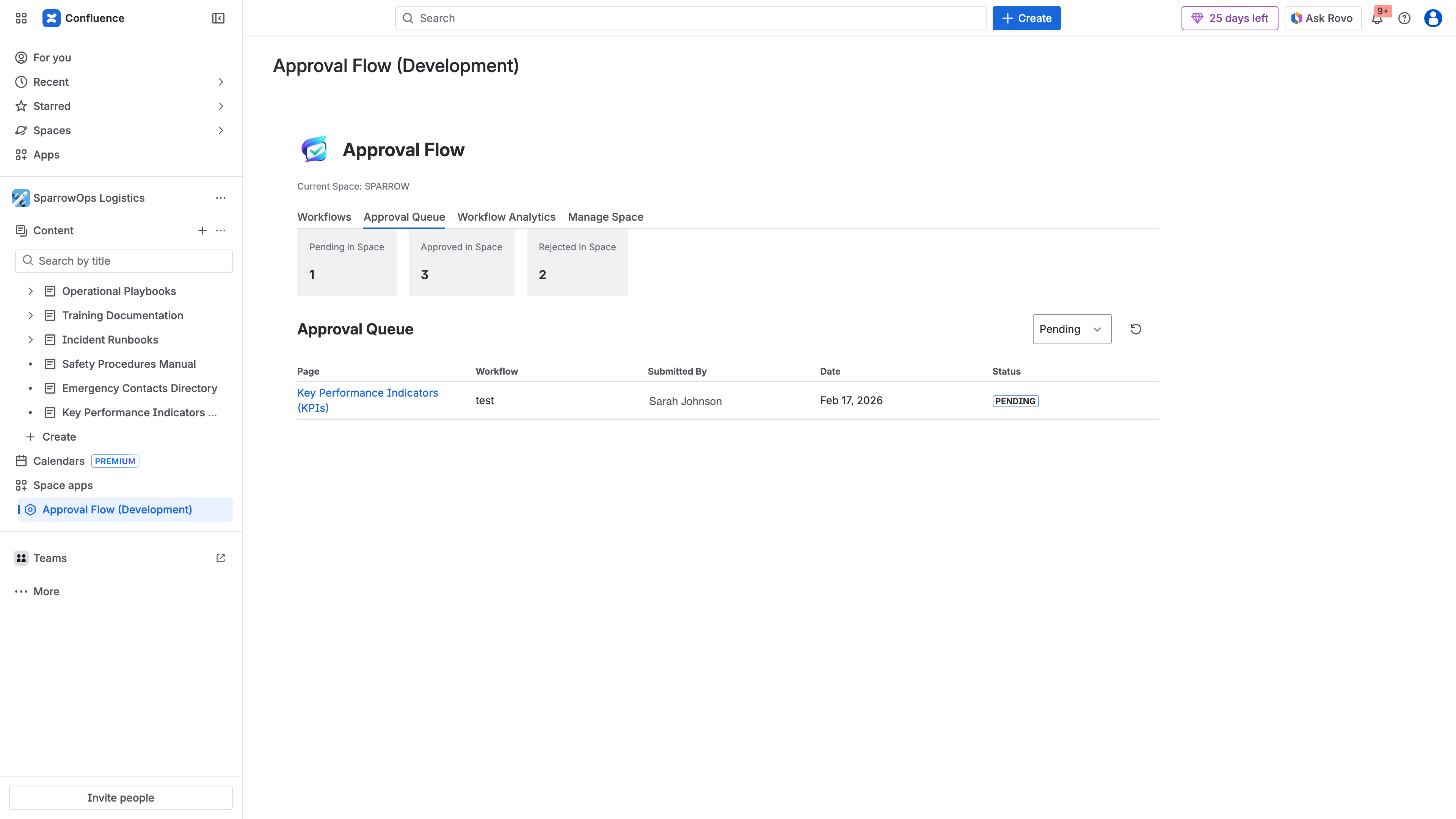
In ApprovalFlow, use Approval Queue to find review records; combine those records with page history and decision comments during your pilot.
Approval evidence can support your controls, but no app choice alone guarantees ISO, SOX, HIPAA, or other compliance. Your policy owners must assess permissions, retention, operating procedures, and evidence quality. For ApprovalFlow’s customer responsibilities, read the product-specific terms.
Compare current pricing, not old headline rates
Use these live Cloud pricing pages with the same site size and billing term:
Record the total quote, included capabilities, and any evaluation terms. Check how licensing applies to your Confluence site rather than assuming only assigned reviewers count. Include the time needed to configure workflows and maintain them after rollout. This article does not name a cheapest app from a dated pricing calculation.
Check the current hosting and security documentation
ApprovalFlow is Forge-native. That platform choice does not by itself establish every security, residency, or compliance requirement for your organization.
Do not assume the competitors still use the hosting model described in an older comparison. Appfire’s current Cloud getting-started documentation includes guidance about upgrading to its Forge version. Ask each vendor about the version you will install, its current data handling, requested permissions, and migration requirements. Compare current disclosures rather than deriving a security ranking from an old Connect-versus-Forge table.
Run the ApprovalFlow pilot if soft review fits
If your requirement is version-aware sign-off on already published content, follow the ApprovalFlow first-workflow tutorial. Configure one workflow, submit a test page, request changes, approve a revision, and then edit it to check version context. Review the result in Approval Queue.
Use the ApprovalFlow product page for the overview and the specific Marketplace listing for installation options. If you are still defining your process, start with the Confluence page approval workflow guide or the multi-step setup tutorial.
Frequently asked questions
Which Confluence approval app should I choose?
Shortlist ApprovalFlow for soft, version-aware review of published pages; Comala for configurable document lifecycle controls; and AppFox Workflows for visual workflow design and publishing controls. Test your required behavior in the Cloud edition before choosing.
Are AppFox Workflows and Approvals the same app?
No. Workflows for Confluence and Approvals for Confluence are separate AppFox products. This comparison covers Workflows, which documents a drag-and-drop builder and multi-stage approvals. Do not apply a feature claim about one app to the other.
Does ApprovalFlow lock pages until approval?
No. ApprovalFlow reviews published pages and does not block publication, lock pages, or replace Confluence permissions. It records review decisions and page-version context while pages remain viewable according to existing permissions.
Does editing an approved page automatically start another review?
ApprovalFlow detects stale approval context, but an edit does not automatically restart the workflow. The owner needs to submit the current version for review when required. Test edit and resubmission behavior separately in every app you evaluate.
Which app is cheapest at my site size?
Use each app’s current Atlassian Marketplace pricing calculator with the same Confluence site size and billing term. This comparison does not rank prices from old per-user rates; licensing tiers and offers can change.
Sources and scope
- ApprovalFlow documentation: workflow setup, byline decisions, queue, analytics, and Change Sets.
- Comala Cloud getting started and the Cloud listing: lifecycle controls, reporting, and current installation context.
- AppFox Workflows getting started and Workflows vs Approvals: builder, review stages, restrictions, and the distinction between its two apps.
Capabilities are vendor-documented and can change. The pilot checklist is our evaluation advice, not a claim that we have tested every configuration.